🔎
Find missing backlinks
Scan submitted URLs and quickly see whether the backlink is present or absent.
Backlinks Analyzer is a simple Windows PC tool built for website owners, SEO freelancers, agencies, and marketers who need to check backlink reports without wasting hours on manual review.
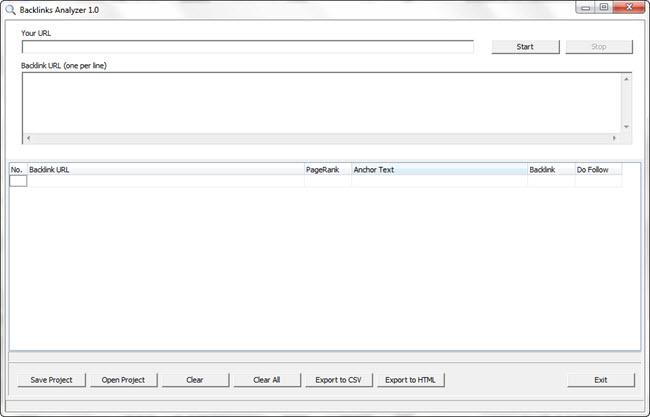
Use Backlinks Analyzer Software to confirm whether backlinks are live, whether the anchor text is correct, and whether your link placements match what you ordered.
Scan submitted URLs and quickly see whether the backlink is present or absent.
Confirm whether vendors used the anchor text you requested and keep your link profile organised.
Identify follow and nofollow links so you understand what type of placement was delivered.
Save results for your own records, clients, or vendors instead of relying on messy notes.
Turn a repetitive manual process into a faster audit workflow that is easier to repeat.
Verify deliverables before accepting a report or buying another backlink package.
Backlinks Analyzer Software gives you a practical way to check backlink reports, review anchors, confirm live placements, and make supplier work easier to trust.
Backlinks Analyzer Software is designed for people who need a reliable way to review backlink work on a Windows PC. When you order links, manage SEO campaigns, or receive backlink reports from freelancers, it is not enough to assume every URL is correct. Links can be missing, changed, nofollowed, placed on the wrong page, or published with the wrong anchor text. Backlinks Analyzer gives you a faster way to inspect those details so you can make better decisions before you approve the work.
The goal is simple: help you check backlinks without spending the whole day opening pages, searching for your domain, copying anchor text, and building your own report by hand. Instead of relying on guesswork, you can run a more structured backlink analysis process from your desktop.
This Backlinks Analyzer is built for Windows users who want straightforward software rather than a complicated subscription dashboard. It is ideal for website owners, SEO consultants, local marketing agencies, link builders, niche site owners, and anyone who regularly needs to validate backlink placements. The software helps you compare the backlink URLs you were given against the target website you are promoting.
If you have ever received a spreadsheet of link placements and wondered which links are actually live, this tool gives you a cleaner way to review them. It can support your quality control process, reduce manual checking, and make client reporting easier.
A good backlink audit is not only about whether a page exists. You also need to know whether the backlink points to the correct website, whether the anchor text matches your campaign, and whether the placement is follow or nofollow. Backlinks Analyzer Software helps bring these checks into one workflow so your review is more organised.
For agencies, this can be especially useful when checking outsourced link building. For solo site owners, it helps you understand exactly what you paid for. For marketers, it creates a repeatable process that is easier to use across multiple campaigns.
Manual backlink checking is slow. You open a URL, wait for the page to load, search for your domain, inspect the link, make a note, then repeat the same task again and again. Backlinks Analyzer Software is made to reduce that repetitive work. By bringing the backlink review process into one tool, it helps you focus on results instead of admin.
That time saving matters when you are checking dozens or hundreds of URLs. Even small improvements in your process can save hours over the course of a campaign, especially when you review links every month.
Backlink campaigns often involve multiple people: the business owner, the SEO manager, the link builder, and sometimes the client. A clear report makes it easier to show what was checked and what needs attention. Backlinks Analyzer helps you keep your backlink verification process more professional, so conversations with suppliers and clients are based on evidence rather than opinion.
When you spot missing or incorrect links, you can request changes more confidently. When links are correct, you can keep a record and move on. This is useful for protecting your SEO budget and improving the quality of future campaigns.
Backlinks Analyzer Software is available for a simple £99 one-time fee or for just £4 per month. The one-time option is ideal if you want to buy the software once and use it as part of your regular SEO toolkit. The monthly option is a low-cost way to start using the software with a smaller upfront payment.
Both options are designed to make professional backlink checking more accessible. Whether you are auditing a single website or checking client campaigns, Backlinks Analyzer gives you a practical Windows PC solution without expensive enterprise pricing.
One of the best times to use Backlinks Analyzer is before you approve a backlink delivery report. If a vendor sends you a list of placements, you can run your checks and look for problems before the campaign is closed. This helps you catch missing links early, ask for replacements, and avoid paying for work that has not been delivered properly.
You can also use it for ongoing monitoring, client reports, campaign reviews, and internal quality control. The result is a backlink checking process that feels more professional and less stressful.
Backlinks Analyzer Software is for anyone who wants a simpler way to check backlinks on a Windows PC. It is useful for SEO freelancers who need to review supplier reports, agencies that want a repeatable quality control process, website owners who buy backlinks, affiliate marketers managing niche sites, and consultants who want to provide clearer evidence to clients.
The software does not replace a complete SEO strategy, but it does help with one important job: verifying backlink placements. When your links are easier to check, your campaigns are easier to manage. If you want a practical Backlinks Analyzer that is affordable, focused, and built for backlink verification, this software is a strong fit.
Backlinks Analyzer SoftwareBacklinks AnalyzerWindows backlink checkerSEO backlink tool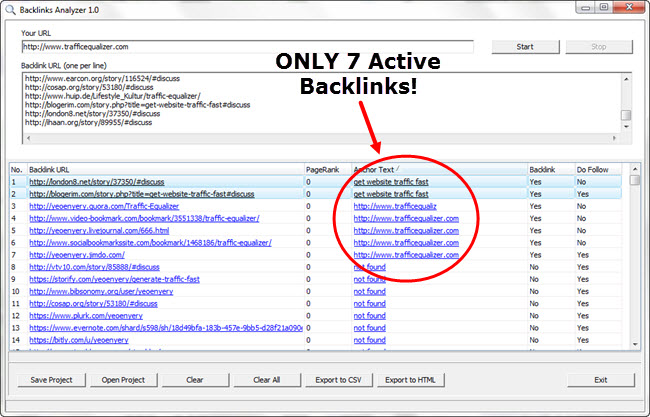
Backlink vendors vary in quality. A professional verification process helps you spot inactive placements, missing links, and mismatched deliverables before they hurt your budget or your reporting.
Compare the vendor’s report against what is actually live.
Find issues while there is still time to ask for corrections.
Use the same review process for every campaign or client.
Paste in the details, start the scan, and review the results from one streamlined interface.
Add the domain or page you want to verify backlinks for.
Add the list provided by your vendor, team, or campaign spreadsheet.
Review backlink status, anchor text, follow attribute, and export the results.
Choose the option that works best for you. Buy Backlinks Analyzer Software once for £99 or start with the monthly plan for just £4 per month.
Two PayPal checkout buttons are included below. Replace the placeholder PayPal URLs with your real PayPal links before publishing.
Replace this URL with your £99 PayPal checkout link.
Replace this URL with your £4/month PayPal subscription link.
Browse practical guides for Windows PC backlink software, backlink checker workflows, anchor text reviews, dofollow and nofollow checks, agency reports, local SEO checks, and supplier verification.
Find pages that explain common backlink checking needs in plain language.
Explore desktop-focused pages for marketers who prefer a simple software workflow.
Compare affordable, simple, agency, freelancer, local SEO, and small business use cases.
Yes. The page now presents the product as Backlinks Analyzer Software for Windows PC.
Yes. The page includes a £99 one-time fee option and a £4 per month option.
Yes. The two PayPal buttons have placeholder URLs ready for your real checkout and subscription links.
It explains Backlinks Analyzer Software in plain language and shows how it helps with backlink checks, reports, and Windows PC workflows.